Fan Remote Control App
- 3.4
- Rating
- 100.00K
- Installs
- Free
- Price
 Analysis by App-foxy
I approached Fan Remote Control App with a very specific expectation: it should make controlling a compatible fan from a phone less awkward than reaching for a separate remote. That narrow purpose is also its main appeal. This is not a smart-home dashboard trying to manage every appliance in the house. It is a focused House & Home app from SMA ENTERPRISE, built around simple fan controls and a quick path to everyday use.
My first impression is that the app makes the most sense for someone who already owns a compatible fan and wants a phone-based alternative to the physical controller. If your fan is supported, the idea is practical: your phone is usually nearby, the controls are easy to understand, and you do not need to keep searching for a small remote between sofa cushions. If compatibility is the deciding factor, however, I would check that point before relying on it as your only control method.
What using the app feels like
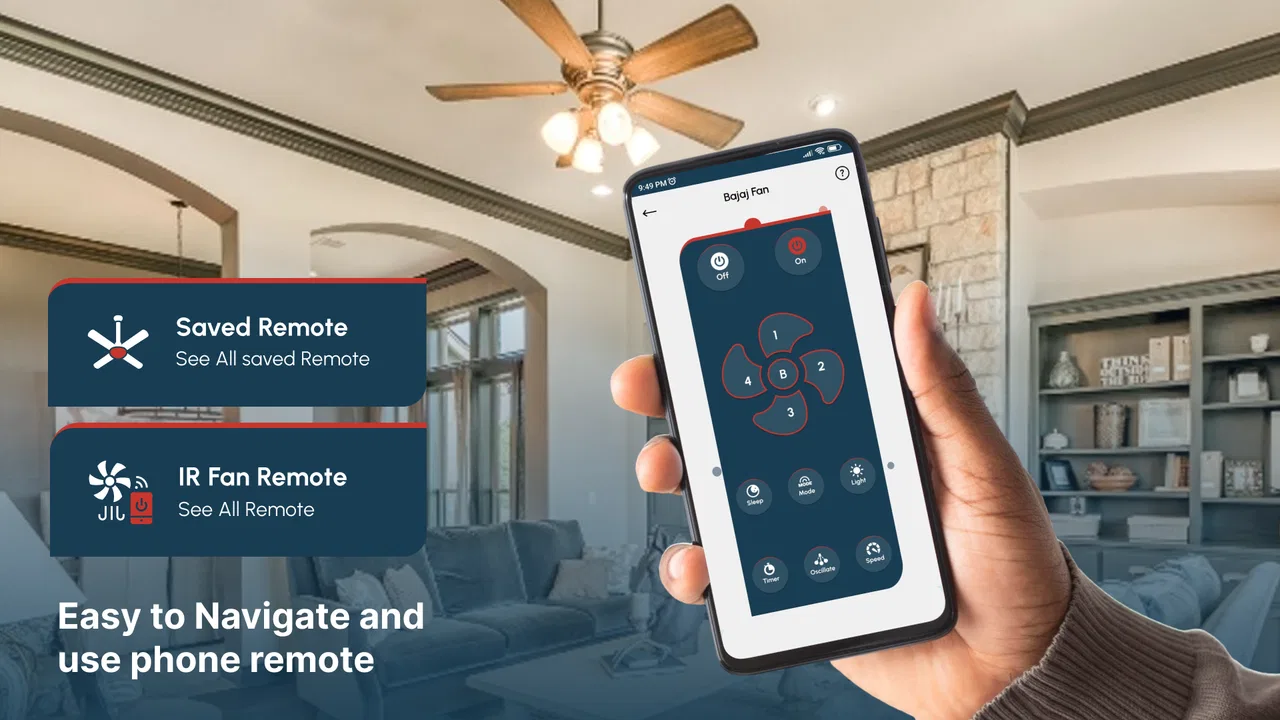
The experience is deliberately straightforward. The store presents it as a “Fan Remote,” and that description sets the right expectations. I would not install it expecting room automation, detailed comfort tracking, or a broad collection of smart-home tools. Its value comes from reducing the task to the essential interaction: open the app, use the available fan controls, and get back to what you were doing.
You May Also Like

 Blood Strike: 2.5 Anniversary
Blood Strike’s Loadouts Turn Every Drop Into a Tactical Gamble
A close look at Blood Strike’s custom loadouts: how fast access to signature weapons reshapes its battle royale rhythm, rewards preparation, and narrows the gap between fights.

 Pandora - Music & Podcasts
Pandora’s Music Is Easy to Start, but Harder to Recover
Pandora’s strength is its low-effort path from a seed to a station. Its weak spot is how much confidence it asks you to place in connection, setup, and quiet recovery.

 8 Ball Pool
 Is Built on Rivalries, Rematches, and Routine
A close look at the rivalries, rematches, shared routines, and unanswered safety questions that turn a quick pool match into a persistent mobile community.

 Samsung Music
’s Quiet Strength Is Playing What You Already Own
Its reach comes less from spectacle than from dependable access to a personal library. That simplicity is both the app’s strongest retention engine and its ceiling.

 AccuWeather: Weather Radar
AccuWeather Review: A Quick, Clear Forecast for Everyday Decisions
For everyday plans, the best forecast is the one you can understand quickly. AccuWeather makes rain timing, radar, and local conditions easy to act on, with a few trade-offs.

 Hill Climb Racing
Why Hill Climb Racing Still Turns Crashes Into One More Run
A tiny car, a bumpy hill and one more upgrade: Hill Climb Racing keeps resurfacing because its simple chaos makes every near-miss feel personal.
More From Our News Desk



That simplicity can be a genuine strength. A complicated interface would add little value to a remote-control app, especially when the typical action is something you want to complete in a few seconds. For a bedroom, home office, living room, or any other space with a compatible fan, the phone can become a convenient backup when the original remote is misplaced or out of reach.
I also think the app suits people who prefer using one familiar device rather than keeping several small controllers around. A phone is easier to locate, and many users already carry it from room to room. The trade-off is equally clear: the app is useful only when the fan and phone can work with it as intended. A physical remote remains the safer fallback if the phone is unavailable, uncharged, or being used by someone else.
The application is free and carries an Everyone content rating, so it is positioned as a general household utility rather than a specialist tool. It runs on devices using Android seven or later. That makes the software accessible to many Android users, although the practical question is still whether the particular fan is compatible. The app has reached over fifty thousand installs, while its listed average rating is zero, so I would treat the install count as evidence of interest rather than as proof that every fan setup will be trouble-free.
Who will get the most from it
I see the strongest fit for a first-time user who wants a basic phone control for a compatible fan and does not want to learn a large smart-home system. It can also be useful in a shared home where the original controller is often left in another room. A phone-based option gives you another way to adjust the fan without interrupting a conversation, getting out of bed, or looking through drawers.
It is less suitable for someone who expects the app to work with every fan, replace a universal remote automatically, or provide advanced scheduling and automation. I would also hesitate to recommend it as the sole control for a household where several people need immediate access but only one phone has the app ready. In that situation, keeping the original remote available is sensible.
Getting from installation to the first useful action
After installing the app, I would begin with the fan rather than tapping around randomly. Have the fan nearby, keep its original controller within reach, and make sure you know which device you want to test. This small preparation matters because it separates an app problem from a fan or compatibility problem. If the fan does not respond, you can quickly compare the phone control with the usual remote.
The current version is 2.0, and the app was released on February 5, 2026. On a supported Android device, the sensible first step is to open the app and look for the most direct route to the fan controls. I would avoid changing several things at once. Test one action, observe the fan, and then move to the next control. That gives you a clear answer about whether the connection and command are working.
A useful first test is the simplest meaningful one: try turning the fan on or off. If that works, test another basic adjustment rather than immediately exploring every option. This staged approach is especially helpful for first-time users because it confirms that the phone is communicating with the fan before you depend on the app during a hot night or a busy work session.
If your fan is already running, begin with a small change that is easy to notice. For example, adjust the operating setting and watch for a response. If the change is not obvious, use the original controller to establish the current state, then try the same type of action in the app. The goal is not to memorize the interface; it is to confirm that one phone command produces one expected result.
The first successful scenario I would use
Imagine settling into bed and realizing the fan is still running more strongly than you want. Instead of getting up to find the controller, you open the app, choose the relevant control, and check whether the fan responds. If the first command works, you have already proved the app’s everyday value. The next time, the process should feel familiar and require less thought.
Another realistic situation is a home office where the fan controller has been left across the room. During a video call or focused work, reaching for it is inconvenient. A phone app can be quicker, but I would still make the adjustment before the room becomes uncomfortable rather than waiting until you are distracted. Simple tools work best when they remove a small interruption, not when they are treated as a complicated system.
A third use case is keeping the physical remote in a consistent place while using the phone for routine changes. This is a better workflow than abandoning the original controller entirely. The app becomes the convenient option, while the physical remote remains available for visitors, family members, or moments when the phone battery is low.
Where first-time users may hesitate
The biggest point of confusion is likely to be compatibility. “Fan Remote” sounds broad, but the useful question is whether your particular fan can respond to this application. I would not assume that an app designed for fan control automatically supports every brand or model. Before making it part of your daily routine, test it with the fan you actually own and keep the original controller nearby during that test.
Another possible source of confusion is the difference between opening an app and controlling a device. Installing the application does not by itself guarantee that the fan will react. The phone, the app, and the fan must all be suitable for the same control method. If the fan does nothing, avoid repeatedly pressing buttons without checking what state the fan is in. Start again with a known state and try one command at a time.
I would also avoid judging the app based on a single failed attempt before checking the basics. Confirm that you selected the intended fan, that the device is powered, and that the app is displaying the controls you expect. If the physical remote works but the phone does not, that points toward a compatibility or setup issue rather than a mechanical problem with the fan. If neither control works, investigate the fan itself first.
The app’s simple focus is helpful here because there are fewer layers to understand than in a full smart-home platform. At the same time, simplicity means there may be less guidance for unusual situations. My practical advice is to establish one reliable action first, then use the app for normal adjustments. Do not make the first test during an urgent situation when you need immediate cooling.
How it compares with the usual alternatives
The most obvious alternative is the fan’s original remote. That controller usually has the advantage of being designed specifically for the fan and ready without opening a phone. It may also be available to everyone in the household. The phone app wins on convenience when the handset is closer, easier to find, or already in your hand.
A universal remote is another option. It can be more useful when one controller needs to operate several compatible appliances, but it introduces another device to buy, store, and configure. For someone who only wants a phone-based way to operate a compatible fan, this app is a more focused choice. For a home with multiple appliance types, a broader solution may be more practical.
Full smart-home platforms can offer a richer central experience, but they are often more involved than necessary for a single fan. I would choose a broader platform only if I already needed its wider household functions. Installing a large system solely to make one fan easier to control would add complexity without guaranteeing a better daily experience.
The important trade-off is convenience versus certainty. A physical controller is direct and independent of your phone. This app is more convenient when your phone is at hand, but it depends on the fan being compatible and the app being ready to communicate with it. That distinction should guide your choice more than the number of buttons on the screen.
Small habits that make the app more dependable
My first tip is to keep the original remote in one fixed location even after the phone control works. This is not redundant. It gives you a recovery option if your phone is charging, unavailable, or being used by another person. It also makes troubleshooting easier because you can compare the app with a control method you already trust.
Second, test the app at a comfortable time and remember the one action you use most. If your main need is changing the fan while working, make that control your first practice. If your main need is adjusting it from bed, test that scenario before bedtime. The best setup is not the one where you explore every possible screen; it is the one where your common action becomes automatic.
Third, do not confuse a lack of visible change with a failed command. Some fan adjustments may be subtle depending on the current setting and the room. When testing, choose an action with an obvious result, then move to finer adjustments. This reduces false conclusions and gives you a more reliable sense of whether the app is responding properly.
Finally, treat the app as a convenience layer rather than a replacement for basic awareness. If the fan is running in an empty room, the phone makes switching it off easier, but it does not decide when that is appropriate. A quick check of the fan’s actual state is still better than assuming the last command was successful.
What I would want you to know before relying on it
I would install this app when the need is narrow and practical: controlling a compatible fan from an Android phone with minimal fuss. The free price removes the cost barrier, and the Everyone rating makes it reasonable for general household use. The Android seven-or-later requirement is also clear enough for a quick device check before installation.
I would skip it, or at least postpone depending on it, if you need guaranteed control across different fan brands, access for several people without preparation, or a complete automation system. In those cases, the original remote, a universal controller, or a broader smart-home option may fit better. The app is not weakened by being focused, but its focus means it should be judged on convenience for compatible fans rather than on features it was never meant to replace.
After trying it, my recommendation is to give it a controlled test with your own fan, beginning with one obvious command and keeping the physical remote close. If that first action succeeds and the app fits your routine, it can be a handy little household tool. If the setup feels uncertain or the fan does not respond consistently, I would return to the original controller instead of forcing the phone into a role it cannot reliably perform.
Overall, Fan Remote Control App is best understood as a focused convenience app, not a complete home-control solution. I like the direct idea and the low-friction purpose, but I would make compatibility the deciding checkpoint. For the right fan and the right user, putting a familiar control in your phone can solve a genuinely annoying everyday problem. For everyone else, the traditional remote may still be the more dependable choice.
FAQs for Fan Remote Control App
01How does the Fan Remote Control App work with my fan?
The Fan Remote Control App connects to your fan using Bluetooth or Wi-Fi, depending on your fan's specifications. Once paired, you can control functions such as speed, oscillation, and timer directly from your smartphone. Ensure your fan model is compatible by checking the app's supported devices list.
02Is the Fan Remote Control App compatible with all fan models?
The app is compatible with a wide range of smart and remote-controlled fans. However, not all models are supported. Before downloading, check the app’s compatibility list to see if your fan model is included. Some older or non-smart fans may not be supported.
03What features does the Fan Remote Control App offer?
The app offers features like adjusting fan speed, setting timers, oscillation control, and scheduling. Some versions also include energy monitoring and voice control integration with smart home systems. Review the app's feature list to ensure it meets your needs before downloading.
04Is there a cost to download or use the Fan Remote Control App?
The Fan Remote Control App is typically free to download, but some features may require in-app purchases or a subscription. Check the app store description for pricing details to avoid unexpected charges. Free versions usually offer basic functionality, while paid features enhance control options.
05What should I do if the app doesn’t connect to my fan?
If the app fails to connect, ensure Bluetooth or Wi-Fi is enabled on both your phone and fan. Restart both devices and try reconnecting. Check for any available app updates. If problems persist, consult the app's troubleshooting guide or contact customer support for assistance.
Pros
- Easy to set up and use.
- Compatible with most fan models.
- Offers customizable fan speeds.
- Includes a timer function.
- User-friendly interface design.
Cons
- Some features require premium.
- May have occasional connectivity issues.
- Limited support for older devices.
- Ads can be intrusive at times.
- Requires a stable internet connection.

Fan Remote Control App
Gallery